

Cart
0


TS S24i-30 23.8'' IPS Monitor|IPS Monitor 23.8'' WLED (1920x1080); 4ms; 100hz; Low Blue Light|125|0|None|None|
Free Standard Shipping Across USA
Brand: Lenovo
Sku: WBMUSB0CH7DVMX6
Couldn't load pickup availability
Sold by eMusicMart, an authorized reseller.
Returns accepted within 30 days | support@emusicmart.com
Shipping Information
- Free Standard Shipping — United States only
- Processing Time: 3–5 business days
- Estimated Delivery: 6–10 business days after dispatch
- Securely packed to ensure your purchase arrives in perfect condition
- Tracking number sent via email once dispatched
Returns & Refund
Returns accepted within 30 days of delivery.
Damaged or Defective Item
Free return shipping + replacement or full refund
Wrong Item Received
Free return shipping + replacement or full refund
Change of Mind
Return shipping at customer's expense · Item must be unused & in original packaging
All returns require a Return Authorization (RA) number before sending.
View Full Return & Refund Policy
Safety & Compliance
⚠️
California Proposition 65 Warning
Some products sold on this website may expose you to chemicals known to the State of California to cause cancer, birth defects, or other reproductive harm.
www.P65Warnings.ca.gov
🛒
General Product Safety Advisory
Always read the product label, instructions, and safety warnings before use. Do not use damaged or modified products. Store products in appropriate conditions as specified by the manufacturer.
Keep all products out of reach of children unless specifically designed for their use.
ℹ️
Product Authenticity & Notice
All products sold by eMusicMart are 100% authentic, sourced directly from authorized brand distributors. Product colors and dimensions may vary slightly from images due to screen calibration and manufacturing tolerances.
eMusicMart — Your Music, Our Passion.
Guarantee safe checkout

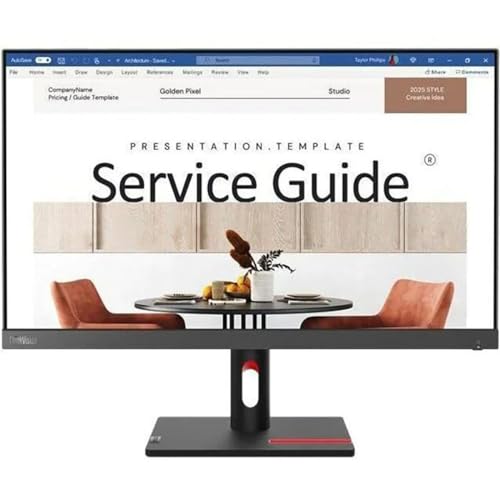
TS S24i-30 23.8'' IPS Monitor|IPS Monitor 23.8'' WLED (1920x1080); 4ms; 100hz; Low Blue Light|125|0|None|None|
$186.54

Frequently Asked Questions
- Q: What is the screen resolution of the Lenovo ThinkVision S24i-30? A: The screen resolution is one thousand nine hundred twenty by one thousand eighty pixels. This Full HD display provides clear and vibrant images.
- Q: What are the dimensions of the Lenovo ThinkVision S24i-30 monitor? A: The monitor measures approximately one point seven inches in depth, twenty-one point two inches in width, and twelve point eight inches in height. These dimensions make it suitable for various desk setups.
- Q: What is the refresh rate of this monitor? A: The refresh rate is one hundred hertz. This high refresh rate ensures smooth visuals, ideal for gaming and video playback.
- Q: How do you adjust the settings on the Lenovo ThinkVision S24i-30? A: You can adjust the settings using the on-screen display menu accessed through the buttons on the monitor. This allows you to customize brightness, contrast, and color settings.
- Q: Is the Lenovo ThinkVision S24i-30 suitable for gaming? A: Yes, it is suitable for gaming due to its one hundred hertz refresh rate and four millisecond response time. These features help deliver a smooth gaming experience.
- Q: Can the monitor be wall-mounted? A: Yes, the Lenovo ThinkVision S24i-30 can be wall-mounted using a VESA mount. This provides flexibility in positioning the monitor to save desk space.
- Q: What is the best way to clean the monitor screen? A: To clean the screen, use a microfiber cloth slightly dampened with water or a screen-safe cleaner. Avoid using harsh chemicals that can damage the display.
- Q: Does the monitor have built-in speakers? A: No, the Lenovo ThinkVision S24i-30 does not have built-in speakers. External speakers or headphones are needed for audio output.
- Q: What type of connectivity options does this monitor have? A: It features HDMI and DisplayPort connections. This allows for easy connections to various devices like computers and gaming consoles.
- Q: Is the Lenovo ThinkVision S24i-30 good for photo editing? A: Yes, it is good for photo editing due to its IPS panel that provides accurate color reproduction and wide viewing angles.
- Q: What type of warranty does the Lenovo ThinkVision S24i-30 come with? A: It typically comes with a three-year limited warranty. This covers defects in materials and workmanship under normal use.
- Q: What is the power consumption of the Lenovo ThinkVision S24i-30? A: The power consumption is approximately twenty-five watts during operation. This makes it energy-efficient compared to many other monitors.
- Q: How do I set up the Lenovo ThinkVision S24i-30? A: To set it up, connect the monitor to a power source and connect it to your device using HDMI or DisplayPort. Then, turn it on and adjust the settings as needed.
- Q: What is the weight of the Lenovo ThinkVision S24i-30? A: The monitor weighs approximately six point nine pounds without the stand. This makes it relatively easy to move and install.
- Q: Can I use this monitor for dual-screen setups? A: Yes, it is compatible for use in dual-screen setups. The slim bezels help minimize distractions between displays.