

Cart
0

VALETON Multi Effects Processor Multi-Effects guitar Bass Pedal with Expression Pedal FX Loop MIDI IO Amp Modeling IR cabinets O
Free Standard Shipping Across USA
Brand: VALETON
Sku: WBMUSB0B6F97QHS
Couldn't load pickup availability
Sold by eMusicMart, an authorized reseller.
Returns accepted within 30 days | support@emusicmart.com
Shipping Information
- Free Standard Shipping — United States only
- Processing Time: 3–5 business days
- Estimated Delivery: 6–10 business days after dispatch
- Securely packed to ensure your purchase arrives in perfect condition
- Tracking number sent via email once dispatched
Returns & Refund
Returns accepted within 30 days of delivery.
Damaged or Defective Item
Free return shipping + replacement or full refund
Wrong Item Received
Free return shipping + replacement or full refund
Change of Mind
Return shipping at customer's expense · Item must be unused & in original packaging
All returns require a Return Authorization (RA) number before sending.
View Full Return & Refund Policy
Safety & Compliance
⚠️
California Proposition 65 Warning
Some products sold on this website may expose you to chemicals known to the State of California to cause cancer, birth defects, or other reproductive harm.
www.P65Warnings.ca.gov
🛒
General Product Safety Advisory
Always read the product label, instructions, and safety warnings before use. Do not use damaged or modified products. Store products in appropriate conditions as specified by the manufacturer.
Keep all products out of reach of children unless specifically designed for their use.
ℹ️
Product Authenticity & Notice
All products sold by eMusicMart are 100% authentic, sourced directly from authorized brand distributors. Product colors and dimensions may vary slightly from images due to screen calibration and manufacturing tolerances.
eMusicMart — Your Music, Our Passion.
Guarantee safe checkout

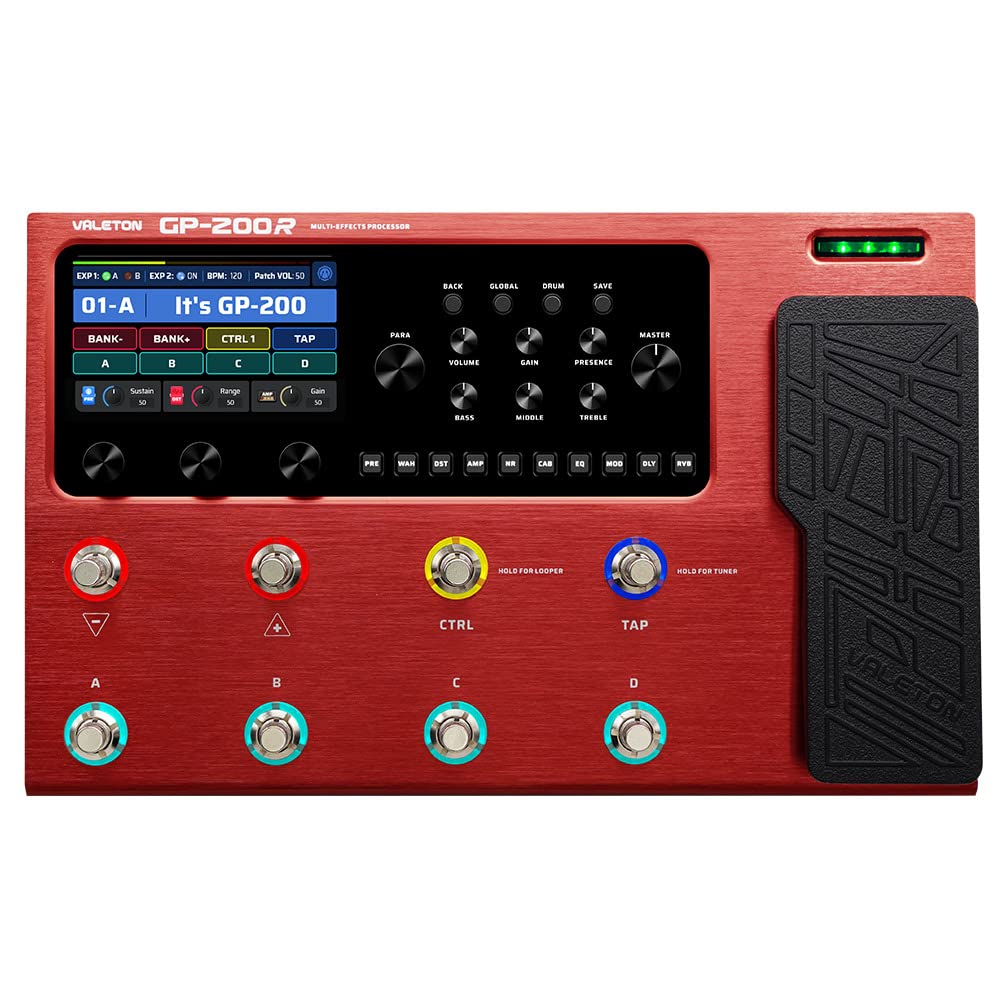
VALETON Multi Effects Processor Multi-Effects guitar Bass Pedal with Expression Pedal FX Loop MIDI IO Amp Modeling IR cabinets O
$474.38

Frequently Asked Questions
- Q: What are the key specifications of the VALETON GP-200R? A: The VALETON GP-200R features over two hundred forty built-in guitar, bass, and acoustic effects. It also includes one hundred forty legendary amplifier and cabinet simulations.
- Q: What is the signal processing quality of the GP-200R? A: The signal processing quality is twenty-four bit at forty-four point one kilohertz. This high-definition quality enhances the overall sonic experience.
- Q: What size screen does the GP-200R have? A: The device has a four point three-inch TFT color LCD screen. This user-friendly interface allows for easy navigation and adjustments.
- Q: How do I connect external devices to the GP-200R? A: You can connect external devices using the line, XLR, and headphone I/O ports. Additionally, it has MIDI IN and EXP2 jacks for connecting controllers.
- Q: How many presets can I save on the GP-200R? A: You can save up to two hundred fifty-six presets on the GP-200R. This allows for extensive customization and quick access to different sound settings.
- Q: What types of audio connections are available on the GP-200R? A: The GP-200R offers USB Type-C connections for audio streaming. It also supports OTG functionality for direct connections to mobile devices.
- Q: How do I use the looper feature on the GP-200R? A: The looper feature allows for up to one hundred eighty seconds of looping. You can easily access this function through the user interface to enhance your performance.
- Q: Is the GP-200R suitable for beginners? A: Yes, the GP-200R is suitable for beginners and professionals alike. Its user-friendly interface and extensive built-in effects make it easy to start using.
- Q: Can I use third-party impulse responses with the GP-200R? A: Yes, the GP-200R supports storage for twenty third-party impulse responses. This feature allows you to further customize your sound.
- Q: How do I edit sounds on the GP-200R? A: You can edit sounds using the free Mac and Windows software provided by VALETON. This software simplifies managing presets and sound editing.
- Q: What is the best way to care for the GP-200R? A: To care for the GP-200R, keep it clean and store it in a dry place. Avoid exposing it to extreme temperatures or moisture.
- Q: How should I clean the GP-200R? A: Use a soft, dry cloth to clean the GP-200R. Avoid using abrasive materials or liquids that could damage the surface.
- Q: What should I do if the GP-200R arrives damaged? A: If the GP-200R arrives damaged, contact customer support immediately for assistance. They can help you with returns or exchanges.
- Q: Does the GP-200R come with a warranty? A: Yes, the GP-200R typically comes with a manufacturer's warranty. Check your purchase details for specific terms and conditions.
- Q: Are there any common setup issues with the GP-200R? A: Common setup issues may include connectivity problems with external devices. Ensure all connections are secure and refer to the user manual for troubleshooting.
- Q: Is it safe to use the GP-200R for live performances? A: Yes, the GP-200R is designed for live performances. Its robust features and reliable performance make it suitable for stage use.