Cart
0
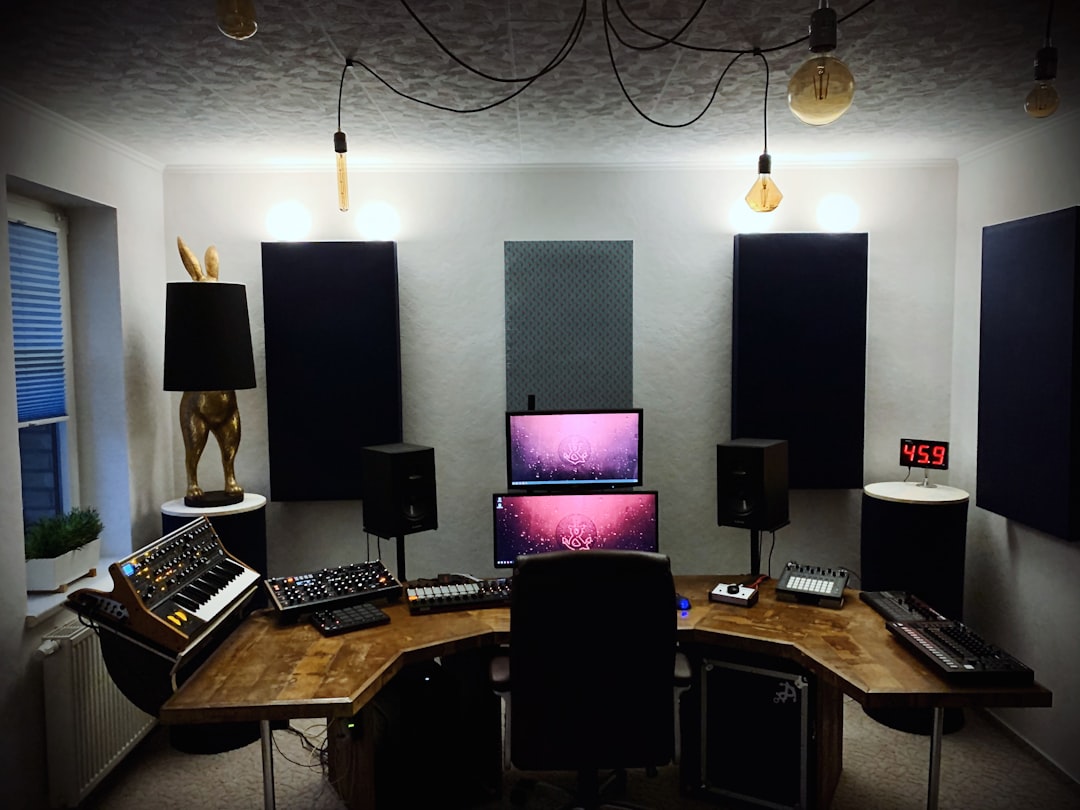
Ultimate Studio Monitor Placement and Room Acoustics Guide for Accurate Sound
Achieving precise and dependable sound in your studio depends not only on the quality of your monitors but critically on how and where you place them within your room. This guide delves into essential techniques and tips to optimize your studio monitor placement, improve room acoustics, and leverage electronic correction tools for professional-grade mixing clarity.
Key Takeaways
- Proper placement of monitors based on equilateral triangle setup ensures balanced stereo imaging.
- Positioning monitors on the short wall and following the “⅓ Rule” reduces bass issues and early reflections.
- Acoustic treatments such as absorption panels, bass traps, and diffusers are vital to control reflections and resonances.
- Symmetry and clear, unobstructed audio paths are crucial for accurate sound representation.
- Electronic room correction tools like Audient’s ORIA Mini and Genelec’s GLM calibration refine the setup further by compensating room anomalies.
- A methodical approach — placement first, treatment second, and electronic correction last — yields the best results.
Table of Contents
- Why Proper Studio Monitor Placement is Essential
- Optimal Stereo Imaging with Equilateral Triangle Placement
- Position Monitors on the Short Wall for Optimal Sound Output
- Monitor Placement Relative to Walls: Follow the “⅓ Rule”
- Clear Audio Path Leads to Clear Sound
- Achieving Perfect Tweeter Height and Monitor Isolation
- Symmetry and Material Matching for Accurate Sound Image
- Acoustic Treatment Fundamentals: Panels and Bass Traps
- Enhancing Sound Monitoring with Electronic Room Correction Tools
- Practical Tips and Common Mistakes to Avoid
- Room Acoustics and Monitor Placement: A Methodical Checklist
- The Impact of a Good Studio Monitor Setup on Music Production
- Conclusion
Why Proper Studio Monitor Placement is Essential
Great studio monitors alone do not guarantee accurate listening; room acoustics play an equal role. Incorrect placement leads to reflections, standing waves, and resonances that distort your perception of a mix. This misrepresentation can cause mixes to translate poorly on other systems and undo hours of meticulous work. Thoughtful placement balances the sound, giving you an honest representation of your music’s frequency and stereo image.
Optimal Stereo Imaging with Equilateral Triangle Placement
Follow the equilateral triangle rule to achieve optimal stereo imaging:
- Place your two monitors the same distance apart.
- Sit so you are the same distance from each monitor.
- Angle the monitors directly towards your ears, with tweeters at ear level.
This setup sharpens spatial awareness and enables clearer decision-making during mixing.
Position Monitors on the Short Wall for Optimal Sound Output
In rectangular rooms, place your monitors along the shorter wall facing the length of the room. This reduces early reflections from side walls and improves soundstage depth. This professional standard is utilized in studios, theaters, and cinemas worldwide to maintain sonic clarity.
Monitor Placement Relative to Walls: Follow the “⅓ Rule”
Bass response is heavily influenced by how close your monitors are to walls:
- Too close: Bass may become overly amplified and boomy.
- Too far: Loss of low-frequency impact.
The common practice is to place monitors about one-third the length into the room from the front wall (“⅓ Rule”). If this creates bass issues, the “⅕ Rule” is a helpful alternative to reduce comb filtering.
Clear Audio Path Leads to Clear Sound
Maintain an unobstructed line of sight between your monitors and ears. Avoid placing monitors behind clutter or reflective objects, as these can degrade sound clarity. A clean setup ensures direct, unaltered audio delivery for the most accurate mixing environment.
Achieving Perfect Tweeter Height and Monitor Isolation
Tweeters reproduce high frequencies and are highly directional. For best clarity:
- Adjust tweeters so they are exactly at ear level when seated.
- Use adjustable stands or isolation pads to reach this height.
- Isolate monitors from desk vibrations by placing them on pads or dedicated stands to minimize resonance and rattling.
These steps yield clearer highs and reduce unwanted interference.
Symmetry and Material Matching for Accurate Sound Image
Symmetry helps maintain tonal and spatial balance. Your monitors should be placed symmetrically concerning the room’s side walls and key reflection points.
Managing Early Reflections Effectively
Early reflections occur when sound hits walls and nearby surfaces causing comb filtering and clarity issues.
- Install matching acoustic panels on both left and right early reflection points to absorb or diffuse reflected sound evenly.
- Use absorbent materials on side walls and ceilings to reduce flutter echoes.
- Place bass traps in corners to control low-frequency buildup and standing waves.
Balanced reflection management sharpens the stereo image and increases mix precision.
Acoustic Treatment Fundamentals: Panels and Bass Traps
Even perfectly positioned monitors benefit greatly from acoustic treatment to control room coloration:
- Absorption Panels: 2 to 6 inches thick, placed at early reflection points on side walls and ceiling to tame mid/high frequency echoes.
- Bass Traps: Thick (4 to 8 inches) in corners to absorb low-frequency resonances and reduce boominess.
- Diffusers: Positioned on the rear wall to scatter sound waves and reduce flutter echoes for a more natural ambiance.
Applying symmetric treatment on both room sides is essential for balanced acoustics.
Enhancing Sound Monitoring with Electronic Room Correction Tools
After physical setup and treatment, electronic room correction can fine-tune your monitoring environment to combat residual issues caused by room imperfections.
Audient’s ORIA Mini and Sonarworks SoundID
ORIA Mini paired with Sonarworks SoundID Reference leverages a microphone measurement to analyze your room’s acoustic response. It applies real-time DSP EQ and phase corrections, supporting up to four calibration profiles. This solution minimizes CPU load while enhancing accuracy and reducing latency.
Genelec GLM Calibration System
Genelec’s GLM automatically measures and calibrates their Smart Active Monitors to compensate for room effects. This system provides a convenient empirical setup ensuring a neutral frequency response for accurate monitoring.
Used alongside proper physical treatments, these tools deliver remarkably consistent monitoring environments.
Practical Tips and Common Mistakes to Avoid
- Keep monitors away from side walls and corners to avoid bass exaggeration.
- Avoid sitting or placing monitors exactly at 25% or 50% marks of the room length—these coincide with problematic room modes.
- Use minimal, non-reflective desks and stands to reduce interference.
- Always strive for symmetrical setups for consistent tonal balance.
- Begin with placing monitors correctly, then add acoustic treatment, and finally apply electronic correction tools for optimal results.
Room Acoustics and Monitor Placement: A Methodical Checklist
- Place studio monitors on the short wall, facing the room lengthwise.
- Form an equilateral triangle with your monitors and listening position.
- Adjust tweeter height to ear level using stands or isolation pads.
- Maintain at least 3 feet distance from monitors to room walls; follow the ⅓ or ⅕ room length placement rule.
- Ensure symmetry relative to side walls and early reflection points.
- Cover early reflection points with matching acoustic panels.
- Install bass traps in every room corner for low-frequency control.
- Add diffusion panels on the rear wall to smooth flutter echoes.
- Keep a clear, unobstructed line of sight between monitors and ears; avoid clutter.
- Use isolation accessories to reduce vibration and resonance.
- Incorporate electronic correction tools like Audient’s ORIA Mini or Genelec’s GLM for final tuning.
The Impact of a Good Studio Monitor Setup on Music Production
Investing effort in proper monitor placement and room treatment yields multiple benefits:
- Reveals true tonal balance and prevents coloration or exaggerated bass.
- Ensures mixes translate accurately across diverse playback devices such as headphones, cars, and smartphones.
- Improves stereo imaging, allowing precise placement of sounds in the mix.
- Reduces ear fatigue by eliminating misleading reflections and harsh frequency peaks.
- Boosts creativity and mixing confidence from a trustworthy monitoring environment.
Even in smaller or multipurpose studios, applying these principles transforms the space into a professional mixing environment.
Conclusion
An optimal studio monitor setup and well-treated room are as vital as the gear itself. Understanding room acoustics, reflections, and bass behavior enables you to create a foundation for authentic sound monitoring. Symmetry, tweeter ear level positioning, appropriate wall distances, and managing reflections through acoustic treatment form the pillars of this foundation. Electronic room correction solutions like Audient’s ORIA Mini and Genelec’s GLM are invaluable final touches to polish your environment without taxing computer resources.
Follow a systematic approach: start with monitor placement, then add treatment, and finish with electronic correction. This diligence will greatly enhance mix clarity and accuracy, helping you deliver professional-quality music that translates impeccably on any platform.
FAQ
Q: Why is the equilateral triangle setup important?
A: It positions speakers and listener equidistantly, creating a balanced stereo image that allows accurate localization of instruments and effects in your mix.
Q: Can I place my monitors along the long wall instead of the short wall?
A: While possible, placing monitors on the shorter wall is preferred as it minimizes early side reflections and improves soundstage depth. Long wall placement often exacerbates acoustic challenges.
Q: How does electronic room correction complement physical acoustic treatment?
A: Electronic correction compensates for residual frequency response issues and phase problems after physical treatments are in place, refining accuracy without replacing the need for proper placement and treatment.
Q: Is monitor isolation really necessary?
A: Yes, isolation pads or stands reduce vibrations transmitted to desks or furniture, which can color the sound and introduce noise, helping preserve clarity and precision.
Q: What’s a quick way to check if my monitor placement is symmetric?
A: Measure equal distances from each monitor to the nearest side walls and ensure acoustic treatment is mirrored on both sides. Visual symmetry generally correlates to acoustic symmetry.
For professional-grade setup kits, consider exploring Audient’s ORIA Mini to boost your monitoring precision today.